Introduction
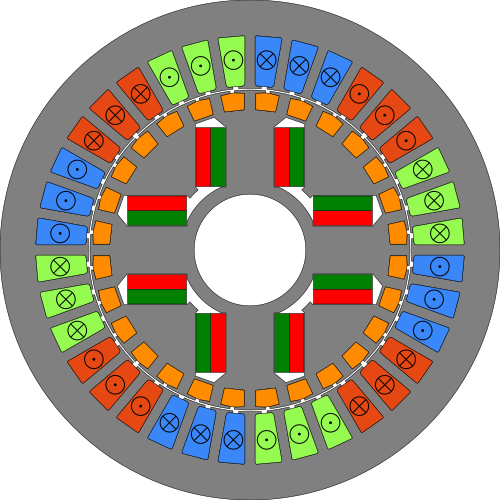
Note: As of Spring 2026, the stem framework and its documentation are under active development. Hence, this book will be expanded substantially over time.
stem is a Simulation Toolbox for Electric Motors written in Rust, consisting of multiple crates (packages / libraries) for defining electric motors, calculation of their properties and simulation of their operating behaviour. This framework offers a huge variety of features, such as:
- calculate winding factors, resistance, inductance, wire length etc. of arbitrary windings,
- get the leakage inductances for a wide variety of slot geometries,
- draw the components for visual inspection (see above),
- define custom magnetic simulation models or use predefined ones to determine the torque of a motor,
- simulate the S1 torque characteristic of a motor using coupled magnetic / thermal models,
- predict the start-up behaviour (maximum currents and torque) of an asynchronous motor starting at the power grid with different loads,
- serialize and deserialize motor components, simulation models or even complex
workflows like S1 torque characteristc calculation using
serde, - create interactive GUIs for winding analysis,
- … and many more!
The individual crates of the ecosystem are designed to be modular and extensible. This makes it easy to define your own custom motor components (e.g. custom magnets), magnetic / thermal models or even optimization routines.
This book is a tutorial / manual for stem, showcasing how to use it, its general design philosophy, its components and how to extend it. The API documentation of the individual crates can be found on https://docs.rs/. Where appropriate, this book provides links to them. The book assumes knowledge of Rust and yaml.
As of now, all the features hinted at above exist, but most of the ecosystem is not yet uploaded to crates.io due to a lack of documentation (and in practice, software without good documentation is hardly usable). Over the following months, I strive to fix this one crate at a time and to upload them individually to Github and crates.io.
TODO: stem only for radial flux machines
License
Every crate in the framework as well as this book itself is licensed under the MIT license.
Ecosystem overview
Crates belonging to the ecosystem are prefixed with “stem_” and can be sorted into three different layers:
- The “description layer” offers the fundamental building blocks for defining a motor: Its components, its geometry, its materials, its winding design and so on.
- The “model layer” is centered around the
stem_physical_modelcrate which defines interfaces (traits) for magnetic and thermal models. All other crates within this layer are based on it and describe a particular magnetic or thermal model. - Crates within the “application layer” either provide complex routines for e.g.
the calculation of operational behaviour combining magnetic and thermal models
or form fully self-contained applications such as the
stem_winding_guifor interactive evaluation of winding properties.
Crates belonging to stem
TODO: List the crates here over time
Description layer
stem_material: This is the most foundational crate of stem, because it enables the definition of physical material properties specifically for electromagnetic (and thermal) calculations.stem_magnet: Provides an interface for defining (surface) permanent magnets which can be mounted in the air gap.stem_magnetic_core: TODOstem_motor: TODOstem_slot: TODOstem_winding: TODOstem_wire: Provides an interface for defining electrical wires for the coils of windings.
Model layer
Application layer
Crates related to stem
The following list of crates has been created as enablers for stem, but are not part of the ecosystem and can be meaningfully used outside of it. Types of these crates are often used in the API of “stem_” crates:
akima_spline: Akima spline interpolation with smooth polynomial extrapolation, used for fitting ferromagnetic permeability curves.deserialize_untagged_verbose_error: Deserialization of untagged enums with detailed error messages. Oftentimes, motor components can be equivalently represented in different ways (for example, an arc magnet can be defined by its inner and outer radius or by its inner radius and thickness). Since the default untagged deserialization mechanism inserdedoes not create helpful error messages, this crate is used throughout stem instead.dyn_quantity: Whenever possible, stem uses theuomcrate for zero-cost dimensional analysis. Sometimes however, the units are not known until runtime. Thedyn_quantitycrate fills that gap and provides seamless transformation from and touomtypes.planar_geo: 2D geometry and drawing library. It is used to calculate geometric properties of motor components, perform intersection checks during the assembly of a motor and for drawing.serde_mosaic: Provides a mechanism to define “links” between serialized components. This is useful to e.g. reuse the contents of a file containing the definition of a copper material across multiple serialized motors.var_quantity: Defines quantites whose value depends on that of other quantities - an example would be the specific electric resistivity of a material which depends on the material temperature. This crate serves as the base ofstem_material.
Description of electric motors
Why [
Arc<Material>]?
- Reuse of the same material (e.g. copper) over multiple wires, even when deserializing -> serde_mosaic
Why Box
?
- Generics: Generics bloat: Motor<StatorWinding
, StatorCore, RotorWinding , RotorCore, RotorMagnet> … -> Every function which takes a motor would need to be completely generic - Enum: a) Not user-extensible. b) Adding a new wire type would be a breaking change
Performance issue compensated by caching in SimMotor -> No need to call methods of wires, slots etc. in a tight loop of a simulation.“ “
Serialization and deserialization
In stem, motors, their components and whole self-contained simulation models can be serialized and deserialized using the serde ecosystem. For example, this allows defining a material programmatically, storing its serialized representation somewhere and using it at a later point in time for a motor. Similarily, it is also possible to write a file (e.g. a .yaml-file) describing a motor or simulation model and then use it in a program based on stem. The flexibility granted by serde allows using a huge variety of different formats such as JSON, YAML, TOML, Pickle, CSV, Postcard, BSON and so on. Within this book and the crates of stem, the .yaml-format is used throughout the examples.
At the end of this page, there is a complete yaml-example for a motor showcasing the features described in the following sections. The stem test database contains various examples for materials and motors as well.
Distributed storage in a database using serde_mosaic
Units
Serialization
The SI-quantities defined by the uom crate are
used extensively throughout stem to provide type-safe dimensional analysis. When
serializing an uom Quantity using the Serialize implementation provided by
uom, only the raw value in base units is stored. In practice, this means that
the serialized representation (in .yaml) of this struct:
my_length = MyLength {length: uom::si::f64::Length::new::<uom::si::length::millimeter>(1.0)};
… looks like this:
length: 0.001
Sometimes, it might be preferable to serialize the length field together with
its SI units as a string. For this purpose, the
dyn_quantity crate offers the
serialize_quantity
function, which is used for all Quantity fields throughout stem:
#![allow(unused)]
fn main() {
#[derive(Serialize)]
struct LengthWrapper {
    #[serde(deserialize_with = "serialize_quantity")]
    length: Length,
}
}
When used in conjunction with the
serialize_with_units wrapper (also from dyn_quantity),
serializing LengthWrapper adds the units to the serialized representation:
#![allow(unused)]
fn main() {
let length = LengthWrapper {length: Length::new::<millimeter>(1.0)};
serialize_with_units(||{serde_yaml::to_string(&length)}).expect("serialization succeeds");
}
results in
length: 0.001 m
If this wrapper is not used, a Quantity gets serialized as its raw value
(matching default uom behaviour). Due to the reduced memory footprint, this
behaviour is preferable if the serialized representation doesn’t need to be
human-readable.
#![allow(unused)]
fn main() {
let length = LengthWrapper {length: Length::new::<millimeter>(1.0)};
serde_yaml::to_string(&length);
}
results in
length: 0.001
Deserialization
After serializing a quantity together with its units using the aforementioned
mechanism, it must of course be possible to deserialize the resulting string
back into a Quantity. Similarily, when e.g. writing the serialized
representation of a motor by hand, it might be preferable to write the full
quantity instead to increase maintainability.
For this reasons, everytime a quantity gets deserialized in stem, the
deserialize_quantity
function is involved. It is a fully-fledged SI unit parser for strings, which
allows to write the .yaml-file of the example above as:
length: 1 mm
The corresponding struct definition looks like this:
#![allow(unused)]
fn main() {
#[derive(Deserialize)]
struct LengthWrapper {
    #[serde(deserialize_with = "deserialize_quantity")]
    length: Length,
}
}
deserialize_quantity also allows for simple mathematical operations during
parsing, which can be useful to cleanly express a physical quantity as a term:
vacuum_permeability: 4 pi 10^(-7) H/m
When deserializing a field annotated with deserialize_quantity, it is checked
if the dimensions given in the string match that of the quantity. If they don’t,
the deserialization fails and an error pointing out the issue is returned.
Of course, it is still possible to use the “raw” representation from the initial example when manually writing a file. In this case, no dimensional checks are applied.
Example of a motor described in .yaml
TODO: Copy-paste content of https://github.com/StefanMathis/stem_test_database/blob/main/src/RotMotor/FLS-364%20V1.yaml once “stem_motor” has been published.